Your team's content calendar

Plan every client's posts, send them for review, and keep the whole team on the same calendar.

From R$ 24.90 per brand a month, billed yearly

14 days free · No credit card

Tucan's Home screen: today's posts, what's waiting on the client and how the week went.

Illustrative data: the names, clients and posts are fictional.

Made for whoever plans content every month

Agencies
One brand per client, each with its own calendar. Clients approve through a link and pay nothing.
Social media managers
Several clients, no spreadsheet: a calendar for each one and the monthly report ready to send on WhatsApp.
Marketing teams
Script, shoot, edit and approval in the same post, with an owner and a status at every step.

Week, month or list. One plan, three ways to see it.

Every post has a format, a status and an owner. Filter by any of them, move posts between days and open a piece without losing sight of the week.

The month in Tucan's calendar, with each day's posts.

Every file is approved before it goes out

Reviewers open the file, comment on the exact second of the video and approve it or ask for a change. The post shows where the review stands. Once approved, it goes out on YouTube and Pinterest by itself at its time.

  1. Versions

    Every new upload becomes version 2, 3, 4. Nobody approves an old file.

  2. Timestamped comments

    Each comment marks the second of the video and stays with the piece.

  3. A role for reviewers

    Invite the client as a reviewer: they see everything, approve and comment, without editing the plan.

A reel open in Tucan, with the client's change request marked at the second of the video.
Tucan's ideas board, with references and formats.

Save ideas before they get lost

An idea has almost the same shape as a post: title, format, pillar, draft and references. When you turn it into a post you pick the day, time and owner, and the rest comes along.

On the phone, for you and your client

Tucan runs in the browser and installs as an app, no store needed.

  • Install it without a store

    An icon on the home screen, full screen and with notifications, on iPhone and Android.

  • Clients approve from their phone

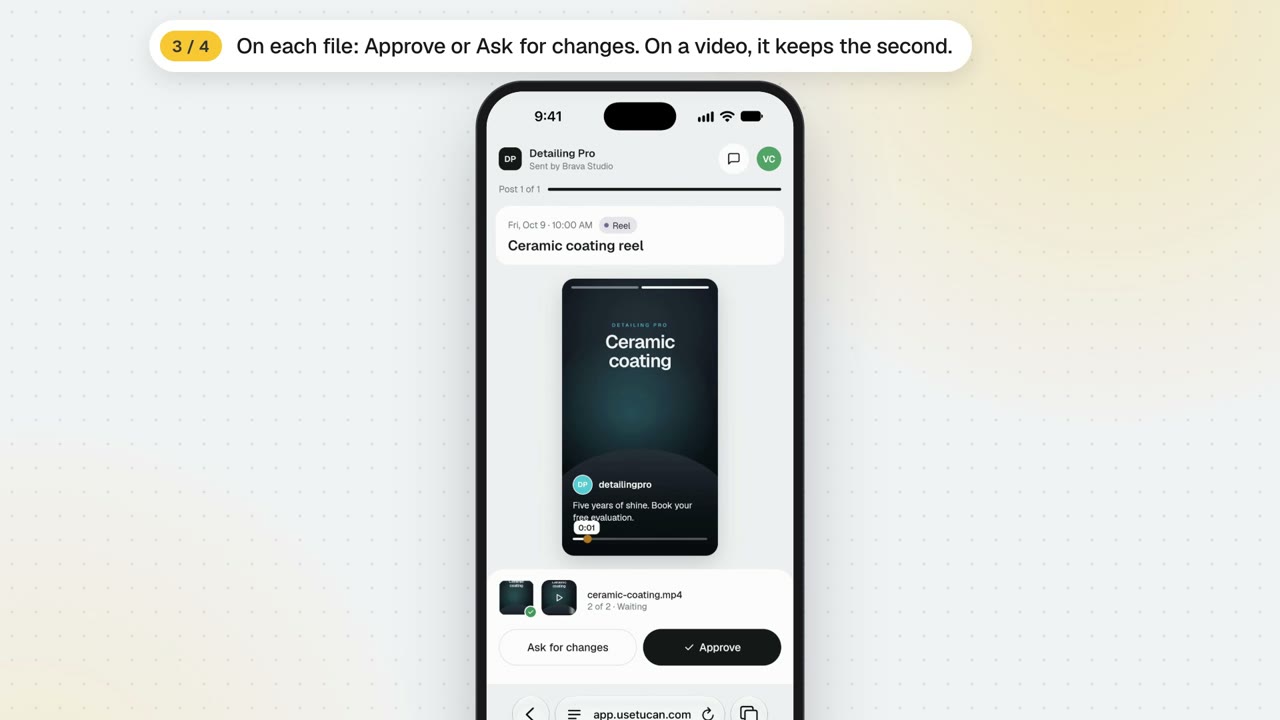
    The link goes out on WhatsApp. Each file gets Approve or Ask for changes, and on a video the request marks the second.

How to install
The page a client opens on their phone to approve or ask for changes.

One price per brand. Your clients don't pay.

More spaceExtra

R$ 12.90per 80 GB more / month

For the brand that keeps a lot of video. Add it when you need it and remove it whenever you like.

Create a free account
  • One pack: the brand keeps 120 GB
  • Two packs: the brand keeps 200 GB
  • On the plan’s invoice
  • Turn it on in Settings → Storage
  • Nothing is deleted if you stop paying for it

Prices in Brazilian reais (BRL), taxes included. The yearly plan is charged at once, at the start of each year, by card or with Pix (Brazil).

Frequently asked questions

No. Your clients join as reviewers: they approve and comment at no cost, and reviewers are unlimited.

From the blog

See all posts

Plan next month in an afternoon

Create a brand, invite your clients and start filling the calendar.

  • 14 days free, no card
  • Unlimited members and reviewers
  • Your client doesn't pay
  • From R$ 24.90 per brand a month, billed yearly

Start in three steps

  1. Create the account

    Sign in with Google or Microsoft and name your first brand.

  2. Bring in who makes and who approves

    Your team joins as members and your client as a reviewer, at no extra cost.

  3. Plan the month

    Drag posts onto the calendar, upload the files and send the approval link on WhatsApp.